
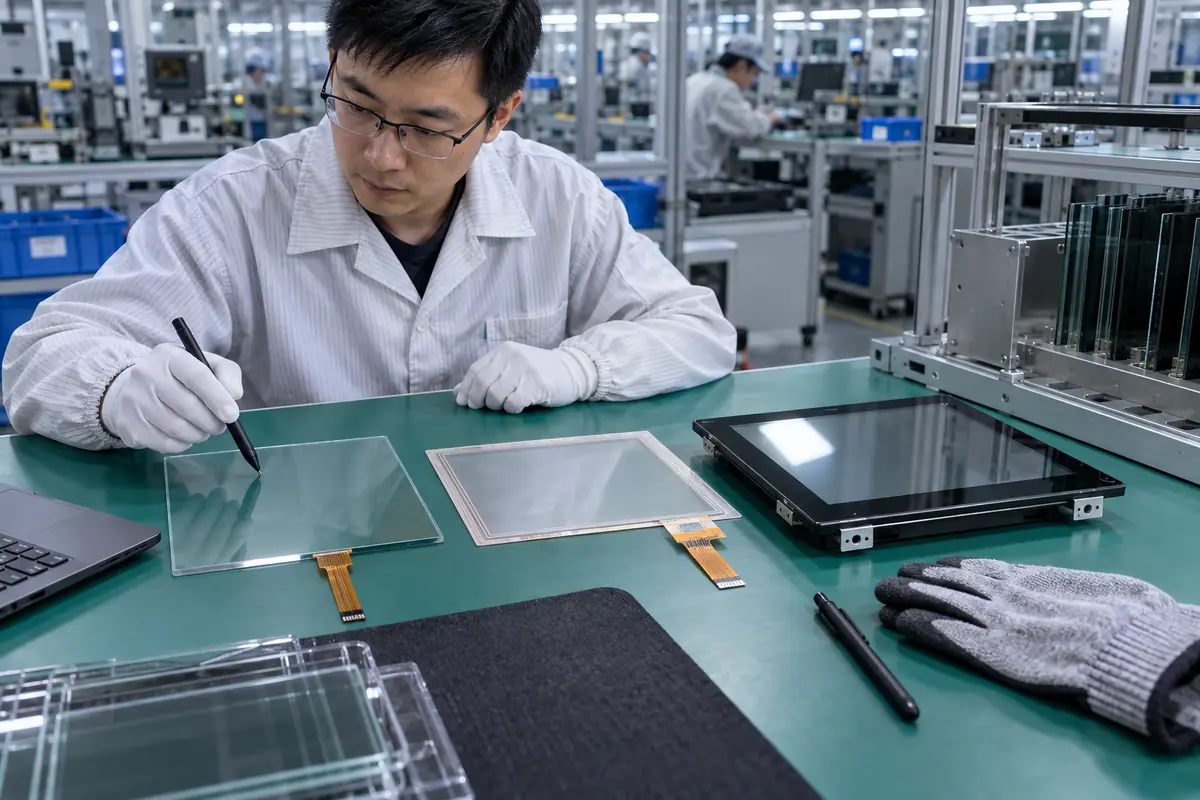
Common touchscreen families include projected capacitive, analog resistive, infrared, acoustic, and specialized optical or force-based systems. A buyer researching "types of touchscreen technology" may receive mismatched quotations because suppliers use familiar terms for different delivery scopes. This guide applies "types of touchscreen technology" across ten practical checks for engineering, purchasing, and quality teams. For "types of touchscreen technology," Yinghong works from drawings, application conditions, and interface requirements. Use this "types of touchscreen technology" review during RFQ checks, sample approval, integration testing, and production release. That sequence helps your team compare factories on one basis for "types of touchscreen technology" without broad marketing claims. It keeps "types of touchscreen technology" scope connected with evidence that engineers and inspectors can verify.
1. How Does Projected Capacitive Touch Work?
Touch technologies often start with projected capacitive sensing for smooth glass, gestures, and multi-touch. In an RFQ, the phrase "types of touchscreen technology" must cover projected capacitive sensing without ambiguity. A patterned electrode grid measures changes caused by a conductive object near or on the overlay. Thick gloves, water, display noise, or heavy cover glass can narrow the tuning window.
Start with projected capacitive sensing. Review projected capacitive sensing with teams that own mechanics, electronics, firmware, purchasing, and quality. Each function sees a different projected capacitive sensing failure path. A short cross-functional review prevents expensive assumptions around "types of touchscreen technology" and records ownership.
Which evidence supports projected capacitive sensing?
- Define overlay stack
- Set touch point count
- Test gloves
- Test wet surface
| Buyer check | Evidence | Release rule |
|---|---|---|
| Define overlay stack | Controlled drawing | Scope and revision match |
| Set touch point count | Approved sample | Construction matches approval |
| Test gloves | Relevant test record | Method fits stated use |
| Test wet surface | Batch inspection record | Result meets agreed limit |
Use the capacitive touchscreen options as related context for "types of touchscreen technology." Buyer action: evaluate PCAP with final mechanics, controller, firmware, and expected contaminants.
2. How Does Resistive Touch Work?
Touch technologies include resistive panels that locate pressure through contact between conductive layers. The question "types of touchscreen technology" also raises a practical issue around resistive sensing. Surface wear, flex layer damage, calibration drift, and low optical clarity can affect service. Four-wire and five-wire structures drive and measure axes through different electrode arrangements.
A drawing for resistive sensing settles this quickly. A useful review connects resistive sensing with one drawing, one sample revision, and one test plan. Buyers should compare matching scope for resistive sensing before price. A supplier should record every accepted deviation involving resistive sensing for production and receiving inspection.
Which evidence supports resistive sensing?
- Choose wire structure
- Set activation force
- Check stylus use
- Plan calibration
| Buyer check | Evidence | Release rule |
|---|---|---|
| Choose wire structure | Controlled drawing | Scope and revision match |
| Set activation force | Approved sample | Construction matches approval |
| Check stylus use | Relevant test record | Method fits stated use |
| Plan calibration | Batch inspection record | Result meets agreed limit |
Use the resistive touchscreen options as related context for "types of touchscreen technology." Buyer action: use resistive touch when pressure input and broad stylus compatibility outweigh gesture needs.
3. When Does Infrared Touch Make Sense?
Touch technologies include infrared frames that detect beam interruption around a display perimeter. For a buyer asking "types of touchscreen technology," sourcing decisions depend on infrared touch frames. Emitters and receivers form a light grid without adding a sensing film across viewing area. Dust, bezel blockage, sunlight, insects, or accidental objects can create missed or false events.
Factory evidence for infrared touch frames beats a sales label. Treat infrared touch frames as a project condition rather than catalog copy. Engineering can define a pass rule for infrared touch frames before samples arrive. Purchasing and quality teams can then apply that rule without hidden changes in "types of touchscreen technology."
Which evidence supports infrared touch frames?
- Check bezel depth
- Test bright light
- Plan cleaning
- Block stray objects
| Buyer check | Evidence | Release rule |
|---|---|---|
| Check bezel depth | Controlled drawing | Scope and revision match |
| Test bright light | Approved sample | Construction matches approval |
| Plan cleaning | Relevant test record | Method fits stated use |
| Block stray objects | Batch inspection record | Result meets agreed limit |
Use the touch display module integration as related context for "types of touchscreen technology." Buyer action: review frame depth, cleaning access, ambient light, and bezel protection.
4. What Does Surface Acoustic Wave Offer?
Touch technologies can use acoustic waves that travel across glass and change when touched. Teams researching "types of touchscreen technology" also need a clear decision on acoustic wave sensing. Water, dirt, scratches, soft objects, or edge contamination may disturb wave paths. This approach can preserve optical clarity because a conductive overlay layer is not required across viewing area.
Check acoustic wave sensing before sampling. Buyers should ask how factory controls carry acoustic wave sensing from design review into production. One sample for acoustic wave sensing shows a single build at one moment. Batch records for "types of touchscreen technology" reveal whether materials, firmware, tooling, and inspection stayed aligned.
Which evidence supports acoustic wave sensing?
- Define contamination
- Check glass damage
- Test input object
- Inspect edge seals
| Buyer check | Evidence | Release rule |
|---|---|---|
| Define contamination | Controlled drawing | Scope and revision match |
| Check glass damage | Approved sample | Construction matches approval |
| Test input object | Relevant test record | Method fits stated use |
| Inspect edge seals | Batch inspection record | Result meets agreed limit |
Use the fully laminated touchscreen construction as related context for "types of touchscreen technology." Buyer action: match acoustic technology with a clean controlled environment and suitable input method.
5. Where Do Optical Touch Systems Fit?
Touch technologies also cover camera or optical systems that observe touch positions above a display. In an RFQ, the phrase "types of touchscreen technology" must cover optical sensing without ambiguity. Optical geometry can scale across large formats and may support multiple inputs without a transparent sensor film. Lighting, occlusion, bezel design, calibration, and camera placement can affect accuracy.
One missing optical sensing detail can shift ownership. A practical decision on optical sensing needs application data, product drawings, and relevant evidence. No sales phrase can prove optical sensing for "types of touchscreen technology." Keep measurable optical sensing acceptance points and approved references available for supplier and buyer.
Which evidence supports optical sensing?
- Map ambient light
- Check occlusion
- Set bezel geometry
- Plan calibration
| Buyer check | Evidence | Release rule |
|---|---|---|
| Map ambient light | Controlled drawing | Scope and revision match |
| Check occlusion | Approved sample | Construction matches approval |
| Set bezel geometry | Relevant test record | Method fits stated use |
| Plan calibration | Batch inspection record | Result meets agreed limit |
Use the industrial control touchscreen solutions as related context for "types of touchscreen technology." Buyer action: validate expected room light, display size, user position, and maintenance access.
6. How Do Force-Based Systems Differ?
Touch technologies include force-based designs that measure physical load rather than only surface contact. The question "types of touchscreen technology" also raises a practical issue around force and pressure sensing. Mechanical preload, enclosure stiffness, vibration, and mounting tolerance can distort results. Load cells, piezo elements, or pressure structures can work behind metal or sealed covers in specialized interfaces.
Keep teams aligned on force and pressure sensing. Review force and pressure sensing with teams that own mechanics, electronics, firmware, purchasing, and quality. Each function sees a different force and pressure sensing failure path. A short cross-functional review prevents expensive assumptions around "types of touchscreen technology" and records ownership.
Which evidence supports force and pressure sensing?
- Measure preload
- Control enclosure stiffness
- Test vibration
- Set force thresholds
| Buyer check | Evidence | Release rule |
|---|---|---|
| Measure preload | Controlled drawing | Scope and revision match |
| Control enclosure stiffness | Approved sample | Construction matches approval |
| Test vibration | Relevant test record | Method fits stated use |
| Set force thresholds | Batch inspection record | Result meets agreed limit |
Use the outdoor laminated touchscreen design as related context for "types of touchscreen technology." Buyer action: prototype full mechanics before choosing force thresholds or gesture behavior.
7. Which Technology Handles Gloves Best?
Touch technologies respond differently because glove material, thickness, moisture, fit, and finger area change interaction. For a buyer asking "types of touchscreen technology," sourcing decisions depend on glove operation. Resistive designs respond to pressure while tuned PCAP can support selected gloves under controlled stack conditions. A generic glove claim means little without brand, material, layers, and environmental state.
Test the complete case for glove operation. A useful review connects glove operation with one drawing, one sample revision, and one test plan. Buyers should compare matching scope for glove operation before price. A supplier should record every accepted deviation involving glove operation for production and receiving inspection.
Which evidence supports glove operation?
- Name glove material
- Test wet gloves
- Use several users
- Check edge zones
| Buyer check | Evidence | Release rule |
|---|---|---|
| Name glove material | Controlled drawing | Scope and revision match |
| Test wet gloves | Approved sample | Construction matches approval |
| Use several users | Relevant test record | Method fits stated use |
| Check edge zones | Batch inspection record | Result meets agreed limit |
Use the medical touchscreen applications as related context for "types of touchscreen technology." Buyer action: test actual gloves across sizes, users, moisture levels, and screen regions.
8. Which Technology Fits Wet Environments?
Touch technologies vary in how droplets, films, spray, and conductive liquids affect sensing. Teams researching "types of touchscreen technology" also need a clear decision on water behavior. Wet-touch performance can be confused with safe operation under standing water or submerged use. Firmware can reject some moisture patterns but physical sealing and drainage still govern system reliability.
Make water behavior traceable. Treat water behavior as a project condition rather than catalog copy. Engineering can define a pass rule for water behavior before samples arrive. Purchasing and quality teams can then apply that rule without hidden changes in "types of touchscreen technology."
Which evidence supports water behavior?
- Define water form
- Specify sealing
- Test false touches
- Plan drainage
| Buyer check | Evidence | Release rule |
|---|---|---|
| Define water form | Controlled drawing | Scope and revision match |
| Specify sealing | Approved sample | Construction matches approval |
| Test false touches | Relevant test record | Method fits stated use |
| Plan drainage | Batch inspection record | Result meets agreed limit |
Use the vehicle navigation touchscreens as related context for "types of touchscreen technology." Buyer action: separate touch behavior, enclosure sealing, cleaning, and electrical safety requirements.
9. How Do Optical and Mechanical Needs Compare?
Touch technologies change transparency, thickness, bezel depth, surface feel, activation force, and repair strategy. In an RFQ, the phrase "types of touchscreen technology" must cover system tradeoffs without ambiguity. A technology choice must fit display brightness, viewing angle, enclosure space, user input, and service model. Teams often rank one attribute while ignoring system effects elsewhere.
Production control for system tradeoffs closes the loop. Buyers should ask how factory controls carry system tradeoffs from design review into production. One sample for system tradeoffs shows a single build at one moment. Batch records for "types of touchscreen technology" reveal whether materials, firmware, tooling, and inspection stayed aligned.
Which evidence supports system tradeoffs?
- Compare optical loss
- Check stack thickness
- Review service plan
- Weight user needs
| Buyer check | Evidence | Release rule |
|---|---|---|
| Compare optical loss | Controlled drawing | Scope and revision match |
| Check stack thickness | Approved sample | Construction matches approval |
| Review service plan | Relevant test record | Method fits stated use |
| Weight user needs | Batch inspection record | Result meets agreed limit |
Use the factory background as related context for "types of touchscreen technology." Buyer action: score each option against weighted project conditions with evidence.
10. How Should Buyers Choose a Technology?
Touch technologies should be chosen through application risk, not popularity or consumer familiarity. The question "types of touchscreen technology" also raises a practical issue around technology selection. Switching technology late can reopen tooling, firmware, enclosure, and validation work. User input, environment, mechanics, optics, electronics, software, compliance, volume, and lifecycle all shape fit.
Put technology selection into writing. A practical decision on technology selection needs application data, product drawings, and relevant evidence. No sales phrase can prove technology selection for "types of touchscreen technology." Keep measurable technology selection acceptance points and approved references available for supplier and buyer.
Which evidence supports technology selection?
- Build requirement matrix
- Test two candidates
- Review lifecycle
- Sign selection record
Use the engineering contact as related context for "types of touchscreen technology." Buyer action: freeze selection after a documented proof-of-concept on final conditions.
Frequently Asked Questions About types of touchscreen technology
Q1: What does types of touchscreen technology mean for a buyer? It defines touch technology families, operating tradeoffs, and selection criteria. Purchasing, engineering, and quality teams can then compare suppliers on one basis for "types of touchscreen technology."
Q2: Which information should I send with an RFQ about types of touchscreen technology? Send application conditions, target dimensions, interface needs, environmental limits, annual volume, and requirements connected with resistive sensing.
Q3: Can I approve types of touchscreen technology from a visual sample alone? No. A visual sample cannot prove force and pressure sensing, controller behavior, dimensional consistency, or batch control. Pair "types of touchscreen technology" samples with drawings and test records.
Q4: How do I know whether two types of touchscreen technology quotations match? Build a types of touchscreen technology comparison sheet for delivery scope, materials, controller, firmware, interfaces, dimensions, tolerances, and tests. Add documentation, packing, and change-control fields for "types of touchscreen technology."
Q5: What should I verify before types of touchscreen technology mass production? Verify signed drawings, approved samples, integration results, golden firmware, inspection rules, packaging, and factory controls for system tradeoffs.