
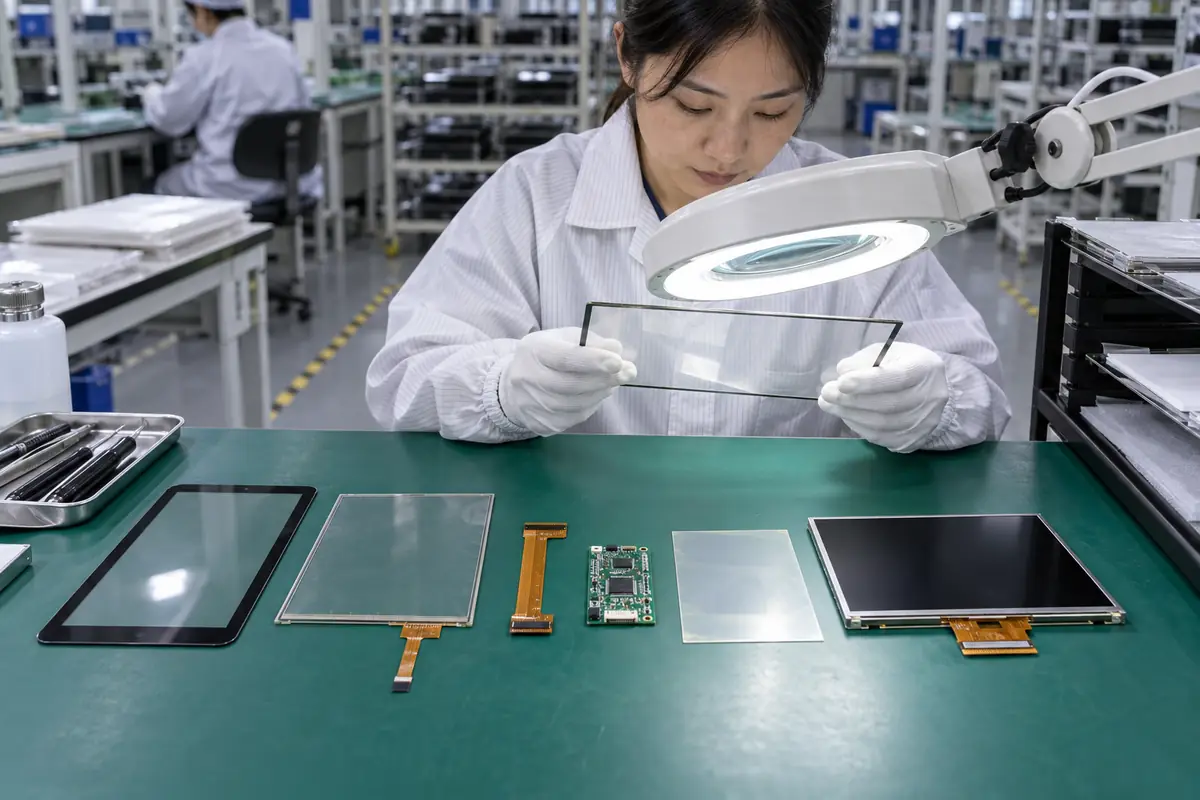
A touchscreen assembly can contain cover glass, a touch sensor, adhesive, controller electronics, FPC, display, backlight, frame, cables, and firmware. A buyer researching "touchscreen components explained" may receive mismatched quotations because suppliers use familiar terms for different delivery scopes. This guide applies "touchscreen components explained" across ten practical checks for engineering, purchasing, and quality teams. For "touchscreen components explained," Yinghong works from drawings, application conditions, and interface requirements. Use this "touchscreen components explained" review during RFQ checks, sample approval, integration testing, and production release. That sequence helps your team compare factories on one basis for "touchscreen components explained" without broad marketing claims. It keeps "touchscreen components explained" scope connected with evidence that engineers and inspectors can verify.
1. What Does Cover Glass Do?
Touchscreen assemblies begin with cover glass that protects inner layers and defines user-facing appearance. The question "touchscreen components explained" also raises a practical issue around cover glass. A cosmetic drawing can omit flatness or printed-border effects that influence bonding and touch response. Glass material, thickness, strengthening, edge finish, printing, holes, coatings, and tolerances affect mechanics and sensing.
Start with cover glass. Treat cover glass as a project condition rather than catalog copy. Engineering can define a pass rule for cover glass before samples arrive. Purchasing and quality teams can then apply that rule without hidden changes in "touchscreen components explained."
How should buyers control cover glass?
- State glass type
- Control thickness
- Define printing
- Set edge finish
| Buyer check | Evidence | Release rule |
|---|---|---|
| State glass type | Controlled drawing | Scope and revision match |
| Control thickness | Approved sample | Construction matches approval |
| Define printing | Relevant test record | Method fits stated use |
| Set edge finish | Batch inspection record | Result meets agreed limit |
Use the capacitive touchscreen options as related context for "touchscreen components explained." Buyer action: approve mechanical, optical, cosmetic, and touch-related glass requirements together.
2. What Is the Touch Sensor?
Touchscreen assemblies center on a transparent sensor that converts interaction into measurable electrical change. For a buyer asking "touchscreen components explained," sourcing decisions depend on touch sensor. Electrode material, pattern, substrate, routing, tail design, and shielding influence sensitivity and durability. Two sensors with identical outline dimensions can behave differently with one controller.
A drawing for touch sensor settles this quickly. Buyers should ask how factory controls carry touch sensor from design review into production. One sample for touch sensor shows a single build at one moment. Batch records for "touchscreen components explained" reveal whether materials, firmware, tooling, and inspection stayed aligned.
How should buyers control touch sensor?
- Name sensor structure
- Check electrode pattern
- Control tail routing
- Define shielding
| Buyer check | Evidence | Release rule |
|---|---|---|
| Name sensor structure | Controlled drawing | Scope and revision match |
| Check electrode pattern | Approved sample | Construction matches approval |
| Control tail routing | Relevant test record | Method fits stated use |
| Define shielding | Batch inspection record | Result meets agreed limit |
Use the resistive touchscreen options as related context for "touchscreen components explained." Buyer action: link sensor drawing, controller part, overlay stack, and firmware revision.
3. Why Does the FPC Matter?
Touchscreen assemblies include an FPC that carries sensor signals between active area and controller or connector. Teams researching "touchscreen components explained" also need a clear decision on flex circuit design. A tail that fits a prototype may crack or interfere after repeated production handling. Bend radius, copper routing, stiffener, contact pitch, tail length, adhesive, and fold direction affect assembly life.
Factory evidence for flex circuit design beats a sales label. A practical decision on flex circuit design needs application data, product drawings, and relevant evidence. No sales phrase can prove flex circuit design for "touchscreen components explained." Keep measurable flex circuit design acceptance points and approved references available for supplier and buyer.
How should buyers control flex circuit design?
- Set tail length
- Mark fold zone
- Specify stiffener
- Match connector pitch
| Buyer check | Evidence | Release rule |
|---|---|---|
| Set tail length | Controlled drawing | Scope and revision match |
| Mark fold zone | Approved sample | Construction matches approval |
| Specify stiffener | Relevant test record | Method fits stated use |
| Match connector pitch | Batch inspection record | Result meets agreed limit |
Use the touch display module integration as related context for "touchscreen components explained." Buyer action: review FPC geometry inside final enclosure and define handling limits.
4. What Does a Touch Controller Do?
Touchscreen assemblies use a controller that scans electrodes, filters noise, calculates coordinates, and reports events. In an RFQ, the phrase "touchscreen components explained" must cover controller electronics without ambiguity. Controller choice sets channel capacity, supported sensor size, interfaces, firmware tools, environmental features, and supply risk. A substitute IC can change tuning, drivers, EMC behavior, and lifecycle.
Check controller electronics before sampling. Review controller electronics with teams that own mechanics, electronics, firmware, purchasing, and quality. Each function sees a different controller electronics failure path. A short cross-functional review prevents expensive assumptions around "touchscreen components explained" and records ownership.
How should buyers control controller electronics?
- Record controller part
- Check channel count
- Confirm interface
- Approve substitution rule
| Buyer check | Evidence | Release rule |
|---|---|---|
| Record controller part | Controlled drawing | Scope and revision match |
| Check channel count | Approved sample | Construction matches approval |
| Confirm interface | Relevant test record | Method fits stated use |
| Approve substitution rule | Batch inspection record | Result meets agreed limit |
Use the fully laminated touchscreen construction as related context for "touchscreen components explained." Buyer action: freeze approved controller and define a written replacement process.
5. Where Does Firmware Fit?
Touchscreen assemblies rely on firmware that turns raw measurements into stable user input. The question "touchscreen components explained" also raises a practical issue around touch firmware. Uncontrolled tuning changes can make visually identical parts perform differently across batches. Thresholds, filters, baseline tracking, glove modes, water logic, palm rejection, and report settings shape behavior.
One missing touch firmware detail can shift ownership. A useful review connects touch firmware with one drawing, one sample revision, and one test plan. Buyers should compare matching scope for touch firmware before price. A supplier should record every accepted deviation involving touch firmware for production and receiving inspection.
How should buyers control touch firmware?
- Lock tuning file
- Record checksum
- Control change log
- Verify programmed units
| Buyer check | Evidence | Release rule |
|---|---|---|
| Lock tuning file | Controlled drawing | Scope and revision match |
| Record checksum | Approved sample | Construction matches approval |
| Control change log | Relevant test record | Method fits stated use |
| Verify programmed units | Batch inspection record | Result meets agreed limit |
Use the industrial control touchscreen solutions as related context for "touchscreen components explained." Buyer action: store a golden configuration with checksum, revision, date, and product scope.
6. Why Are Adhesives and Bonding Layers Used?
Touchscreen assemblies often use OCA, LOCA, tapes, or other bonding materials between layers. For a buyer asking "touchscreen components explained," sourcing decisions depend on adhesive and bonding. Bonding influences reflection, contrast, stiffness, moisture paths, rework, thickness, and stress across temperature. Bubbles, contamination, cure variation, or material changes can affect optics and reliability.
Keep teams aligned on adhesive and bonding. Treat adhesive and bonding as a project condition rather than catalog copy. Engineering can define a pass rule for adhesive and bonding before samples arrive. Purchasing and quality teams can then apply that rule without hidden changes in "touchscreen components explained."
How should buyers control adhesive and bonding?
- Name adhesive
- Define cure process
- Set bubble limits
- Control rework
| Buyer check | Evidence | Release rule |
|---|---|---|
| Name adhesive | Controlled drawing | Scope and revision match |
| Define cure process | Approved sample | Construction matches approval |
| Set bubble limits | Relevant test record | Method fits stated use |
| Control rework | Batch inspection record | Result meets agreed limit |
Use the outdoor laminated touchscreen design as related context for "touchscreen components explained." Buyer action: qualify material, process, inspection, and rework rules as one package.
7. How Does the Display Join the Stack?
Touchscreen assemblies may end at the touch panel or include a TFT LCD and backlight beneath it. Teams researching "touchscreen components explained" also need a clear decision on display integration. A matched diagonal size does not guarantee active-area alignment or electrical compatibility. Display size, active area, brightness, viewing angle, interface, power, and noise all interact with touch design.
Test the complete case for display integration. Buyers should ask how factory controls carry display integration from design review into production. One sample for display integration shows a single build at one moment. Batch records for "touchscreen components explained" reveal whether materials, firmware, tooling, and inspection stayed aligned.
How should buyers control display integration?
- Align active areas
- Match display interface
- Review power
- Test display noise
| Buyer check | Evidence | Release rule |
|---|---|---|
| Align active areas | Controlled drawing | Scope and revision match |
| Match display interface | Approved sample | Construction matches approval |
| Review power | Relevant test record | Method fits stated use |
| Test display noise | Batch inspection record | Result meets agreed limit |
Use the medical touchscreen applications as related context for "touchscreen components explained." Buyer action: use coordinated mechanical and electrical drawings for the complete module.
8. What Role Do Frames and Gaskets Play?
Touchscreen assemblies depend on frames, brackets, gaskets, tapes, and fasteners for support and sealing. In an RFQ, the phrase "touchscreen components explained" must cover mechanical integration without ambiguity. Mounting load, compression, tolerance stack, bezel opening, and grounding can change optical appearance or touch behavior. Excess clamp force may create stress while weak support can permit movement.
Make mechanical integration traceable. A practical decision on mechanical integration needs application data, product drawings, and relevant evidence. No sales phrase can prove mechanical integration for "touchscreen components explained." Keep measurable mechanical integration acceptance points and approved references available for supplier and buyer.
How should buyers control mechanical integration?
- Set gasket compression
- Control clamp load
- Define bezel opening
- Plan grounding
| Buyer check | Evidence | Release rule |
|---|---|---|
| Set gasket compression | Controlled drawing | Scope and revision match |
| Control clamp load | Approved sample | Construction matches approval |
| Define bezel opening | Relevant test record | Method fits stated use |
| Plan grounding | Batch inspection record | Result meets agreed limit |
Use the vehicle navigation touchscreens as related context for "touchscreen components explained." Buyer action: calculate tolerance and compression using final enclosure geometry.
9. Which Cables and Connectors Need Approval?
Touchscreen assemblies include connectors that carry touch data, display signals, power, and sometimes backlight control. The question "touchscreen components explained" also raises a practical issue around cables and connectors. A connector family match can still hide reversed pinout or inadequate retention. Pitch, mating cycles, retention, orientation, cable shielding, pinout, and service access affect integration.
Production control for cables and connectors closes the loop. Review cables and connectors with teams that own mechanics, electronics, firmware, purchasing, and quality. Each function sees a different cables and connectors failure path. A short cross-functional review prevents expensive assumptions around "touchscreen components explained" and records ownership.
How should buyers control cables and connectors?
- Verify pinout
- Name mating part
- Set cable length
- Check retention
| Buyer check | Evidence | Release rule |
|---|---|---|
| Verify pinout | Controlled drawing | Scope and revision match |
| Name mating part | Approved sample | Construction matches approval |
| Set cable length | Relevant test record | Method fits stated use |
| Check retention | Batch inspection record | Result meets agreed limit |
Use the factory background as related context for "touchscreen components explained." Buyer action: approve pinout, mating part, cable drawing, and pull requirements.
10. Which Documents Should Accompany Components?
Touchscreen assemblies need controlled drawings, specifications, firmware records, test criteria, change notices, and packing instructions. For a buyer asking "touchscreen components explained," sourcing decisions depend on technical documentation. Documentation lets multiple teams evaluate one product without relying on email memory or sample labels. Missing revision control creates disputes when a reorder differs from an earlier batch.
Put technical documentation into writing. A useful review connects technical documentation with one drawing, one sample revision, and one test plan. Buyers should compare matching scope for technical documentation before price. A supplier should record every accepted deviation involving technical documentation for production and receiving inspection.
How should buyers control technical documentation?
- Collect signed drawing
- Archive firmware
- Define inspection
- Require change notice
Use the engineering contact as related context for "touchscreen components explained." Buyer action: make document revision part of quotation, approval, purchase order, and inspection.
Frequently Asked Questions About touchscreen components explained
Q1: What does touchscreen components explained mean for a buyer? It defines physical layers, electronics, interfaces, mechanics, and supplied documentation. Purchasing, engineering, and quality teams can then compare suppliers on one basis for "touchscreen components explained."
Q2: Which information should I send with an RFQ about touchscreen components explained? Send application conditions, target dimensions, interface needs, environmental limits, annual volume, and requirements connected with touch sensor.
Q3: Can I approve touchscreen components explained from a visual sample alone? No. A visual sample cannot prove adhesive and bonding, controller behavior, dimensional consistency, or batch control. Pair "touchscreen components explained" samples with drawings and test records.
Q4: How do I know whether two touchscreen components explained quotations match? Build a touchscreen components explained comparison sheet for delivery scope, materials, controller, firmware, interfaces, dimensions, tolerances, and tests. Add documentation, packing, and change-control fields for "touchscreen components explained."
Q5: What should I verify before touchscreen components explained mass production? Verify signed drawings, approved samples, integration results, golden firmware, inspection rules, packaging, and factory controls for cables and connectors.