
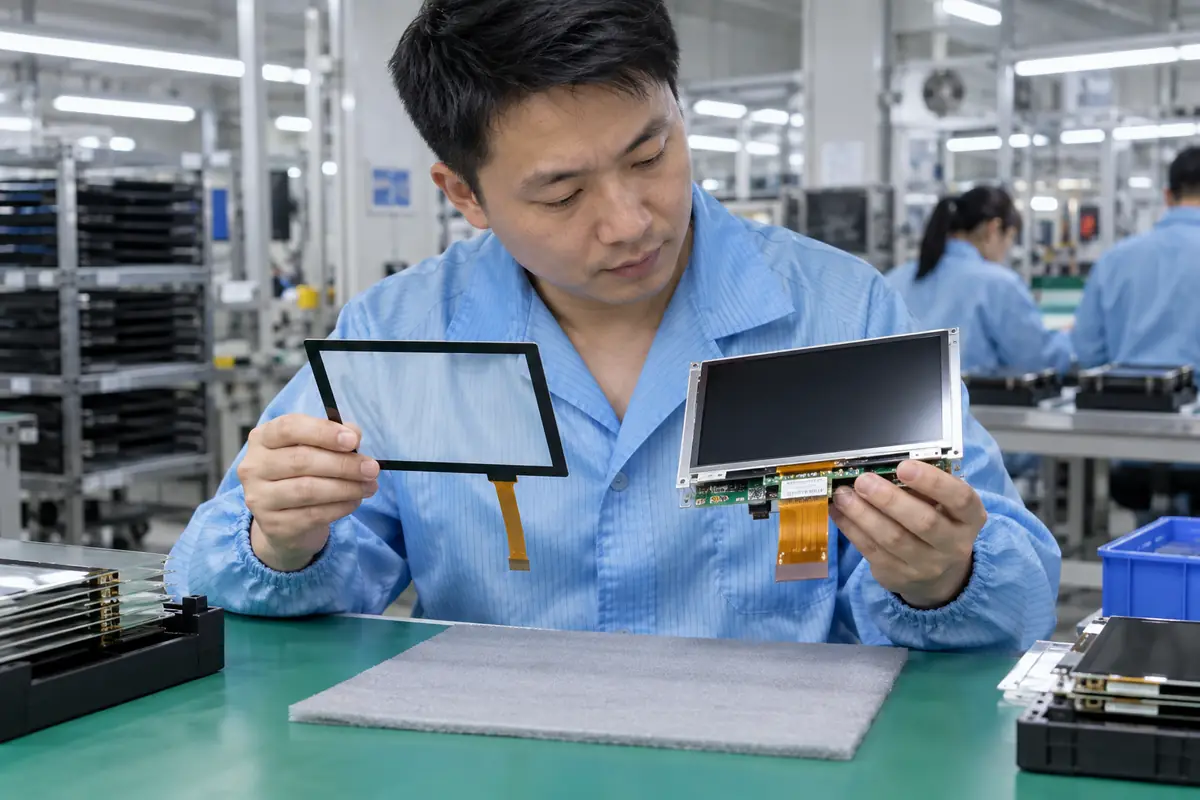
A touch screen may mean a touch-enabled surface, while a touch display module clearly combines touch input with a display assembly. A buyer researching "touch screen vs touch display module" may receive mismatched quotations because suppliers use familiar terms for different delivery scopes. This guide applies "touch screen vs touch display module" across ten practical checks for engineering, purchasing, and quality teams. For "touch screen vs touch display module," Yinghong works from drawings, application conditions, and interface requirements. Use this "touch screen vs touch display module" review during RFQ checks, sample approval, integration testing, and production release. That sequence helps your team compare factories on one basis for "touch screen vs touch display module" without broad marketing claims. It keeps "touch screen vs touch display module" scope connected with evidence that engineers and inspectors can verify.
1. Where Does Each Product Boundary End?
Touch display module scope separates an ambiguous market term from a module intended to include both touch and display functions. The question "touch screen vs touch display module" also raises a practical issue around product boundary. Teams can overestimate integration completeness from the word module. A module may still vary in whether it includes controller boards, frame, backlight driver, cables, or enclosure.
Start with product boundary. Buyers should ask how factory controls carry product boundary from design review into production. One sample for product boundary shows a single build at one moment. Batch records for "touch screen vs touch display module" reveal whether materials, firmware, tooling, and inspection stayed aligned.
Which questions clarify product boundary?
- Mark touch layers
- Mark display layers
- List boards
- List mechanics
| Buyer check | Evidence | Release rule |
|---|---|---|
| Mark touch layers | Controlled drawing | Scope and revision match |
| Mark display layers | Approved sample | Construction matches approval |
| List boards | Relevant test record | Method fits stated use |
| List mechanics | Batch inspection record | Result meets agreed limit |
Use the capacitive touchscreen options as related context for "touch screen vs touch display module." Buyer action: request a block diagram and delivered-parts list from every supplier.
2. Which Display Parts Come with a Module?
Touch display module scope should identify LCD cell, polarizers, backlight, driver ICs, FPCs, timing electronics, and optional boards. For a buyer asking "touch screen vs touch display module," sourcing decisions depend on display contents. Display construction affects brightness, viewing angle, color, power, noise, thickness, and lifecycle. A quoted module may omit a controller board required by the host system.
A drawing for display contents settles this quickly. A practical decision on display contents needs application data, product drawings, and relevant evidence. No sales phrase can prove display contents for "touch screen vs touch display module." Keep measurable display contents acceptance points and approved references available for supplier and buyer.
Which questions clarify display contents?
- Name LCD model
- Define backlight
- List driver board
- Show display FPC
| Buyer check | Evidence | Release rule |
|---|---|---|
| Name LCD model | Controlled drawing | Scope and revision match |
| Define backlight | Approved sample | Construction matches approval |
| List driver board | Relevant test record | Method fits stated use |
| Show display FPC | Batch inspection record | Result meets agreed limit |
Use the resistive touchscreen options as related context for "touch screen vs touch display module." Buyer action: confirm every display interface and power rail on electrical documents.
3. Which Touch Parts Come with a Module?
Touch display module scope should identify cover glass, sensor, FPC, touch controller, firmware, cable, and bonding method. Teams researching "touch screen vs touch display module" also need a clear decision on touch contents. That location changes wiring, software, EMC behavior, and service strategy. A supplier may place controller on the tail, separate board, or customer's host PCB.
Factory evidence for touch contents beats a sales label. Review touch contents with teams that own mechanics, electronics, firmware, purchasing, and quality. Each function sees a different touch contents failure path. A short cross-functional review prevents expensive assumptions around "touch screen vs touch display module" and records ownership.
Which questions clarify touch contents?
- List cover glass
- List sensor
- Locate controller
- Record firmware
| Buyer check | Evidence | Release rule |
|---|---|---|
| List cover glass | Controlled drawing | Scope and revision match |
| List sensor | Approved sample | Construction matches approval |
| Locate controller | Relevant test record | Method fits stated use |
| Record firmware | Batch inspection record | Result meets agreed limit |
Use the touch display module integration as related context for "touch screen vs touch display module." Buyer action: freeze controller location and firmware as part of module part number.
4. How Are Touch and Display Aligned?
Touch display module scope depends on mechanical alignment between touch active area, cover window, LCD active area, bezel, and viewing zone. In an RFQ, the phrase "touch screen vs touch display module" must cover active-area alignment without ambiguity. Datum choice, tolerance stack, bonding fixture, and material shrinkage can shift visible borders. Small misalignment becomes obvious near narrow bezels or printed keys.
Check active-area alignment before sampling. A useful review connects active-area alignment with one drawing, one sample revision, and one test plan. Buyers should compare matching scope for active-area alignment before price. A supplier should record every accepted deviation involving active-area alignment for production and receiving inspection.
Which questions clarify active-area alignment?
- Define datums
- Set alignment tolerance
- Use inspection fixture
- Approve border appearance
| Buyer check | Evidence | Release rule |
|---|---|---|
| Define datums | Controlled drawing | Scope and revision match |
| Set alignment tolerance | Approved sample | Construction matches approval |
| Use inspection fixture | Relevant test record | Method fits stated use |
| Approve border appearance | Batch inspection record | Result meets agreed limit |
Use the fully laminated touchscreen construction as related context for "touch screen vs touch display module." Buyer action: set datums, alignment tolerance, inspection method, and cosmetic limits.
5. How Does Optical Bonding Change a Module?
Touch display module scope changes when touch and display are bonded with optically clear material instead of separated by an air gap. The question "touch screen vs touch display module" also raises a practical issue around optical bonding. A bonding label does not reveal adhesive, cure, bubble limits, or repair path. Bonding can reduce internal reflection and add mechanical coupling while changing process, rework, stress, and yield.
One missing optical bonding detail can shift ownership. Treat optical bonding as a project condition rather than catalog copy. Engineering can define a pass rule for optical bonding before samples arrive. Purchasing and quality teams can then apply that rule without hidden changes in "touch screen vs touch display module."
Which questions clarify optical bonding?
- Name adhesive
- Define process
- Set bubble limit
- Plan rework
| Buyer check | Evidence | Release rule |
|---|---|---|
| Name adhesive | Controlled drawing | Scope and revision match |
| Define process | Approved sample | Construction matches approval |
| Set bubble limit | Relevant test record | Method fits stated use |
| Plan rework | Batch inspection record | Result meets agreed limit |
Use the industrial control touchscreen solutions as related context for "touch screen vs touch display module." Buyer action: qualify process details on final display and cover stack.
6. Which Interfaces Must Match the Host?
Touch display module scope requires both touch-data and display-video interfaces plus power, backlight, reset, and optional control lines. For a buyer asking "touch screen vs touch display module," sourcing decisions depend on host interfaces. Touch may use USB or I2C while display may use RGB, LVDS, MIPI, HDMI, or another route. One compatible interface cannot compensate for another missing host capability.
Keep teams aligned on host interfaces. Buyers should ask how factory controls carry host interfaces from design review into production. One sample for host interfaces shows a single build at one moment. Batch records for "touch screen vs touch display module" reveal whether materials, firmware, tooling, and inspection stayed aligned.
Which questions clarify host interfaces?
- Match touch bus
- Match video bus
- Check voltage
- Define control pins
| Buyer check | Evidence | Release rule |
|---|---|---|
| Match touch bus | Controlled drawing | Scope and revision match |
| Match video bus | Approved sample | Construction matches approval |
| Check voltage | Relevant test record | Method fits stated use |
| Define control pins | Batch inspection record | Result meets agreed limit |
Use the outdoor laminated touchscreen design as related context for "touch screen vs touch display module." Buyer action: create a pin-level interface matrix for complete module.
7. How Does a Module Affect Development Time?
Touch display module scope changes schedule because an integrated module can move alignment, bonding, tuning, and combined tests toward one supplier. Teams researching "touch screen vs touch display module" also need a clear decision on development schedule. A module can shorten coordination only when scope and documentation are mature. Buyer work still includes host electronics, software, enclosure, thermal, power, and system validation.
Test the complete case for development schedule. A practical decision on development schedule needs application data, product drawings, and relevant evidence. No sales phrase can prove development schedule for "touch screen vs touch display module." Keep measurable development schedule acceptance points and approved references available for supplier and buyer.
Which questions clarify development schedule?
- Map supplier tasks
- Map buyer tasks
- Estimate sample rounds
- Plan pilot build
| Buyer check | Evidence | Release rule |
|---|---|---|
| Map supplier tasks | Controlled drawing | Scope and revision match |
| Map buyer tasks | Approved sample | Construction matches approval |
| Estimate sample rounds | Relevant test record | Method fits stated use |
| Plan pilot build | Batch inspection record | Result meets agreed limit |
Use the medical touchscreen applications as related context for "touch screen vs touch display module." Buyer action: compare realistic engineering tasks rather than marketing lead-time claims.
8. Which Reliability Tests Apply?
Touch display module scope requires tests for touch function, display performance, bonding, connectors, mechanics, temperature, humidity, vibration, and application stress. In an RFQ, the phrase "touch screen vs touch display module" must cover module reliability without ambiguity. Combined layers can interact through thermal expansion, pressure, moisture, or electrical noise. Separate component reports may miss stack-level failure modes.
Make module reliability traceable. Review module reliability with teams that own mechanics, electronics, firmware, purchasing, and quality. Each function sees a different module reliability failure path. A short cross-functional review prevents expensive assumptions around "touch screen vs touch display module" and records ownership.
Which questions clarify module reliability?
- Test thermal cycle
- Test humidity
- Test vibration
- Retest touch and display
| Buyer check | Evidence | Release rule |
|---|---|---|
| Test thermal cycle | Controlled drawing | Scope and revision match |
| Test humidity | Approved sample | Construction matches approval |
| Test vibration | Relevant test record | Method fits stated use |
| Retest touch and display | Batch inspection record | Result meets agreed limit |
Use the vehicle navigation touchscreens as related context for "touch screen vs touch display module." Buyer action: request module-specific evidence or run system-level qualification.
9. How Does Supply Lifecycle Differ?
Touch display module scope creates a supply chain containing glass, sensor, controller, firmware, LCD, backlight, boards, adhesives, and tooling. The question "touch screen vs touch display module" also raises a practical issue around supply lifecycle. A single obsolete part can force module redesign and revalidation. Display panels often drive lifecycle risk while custom glass and sensor tooling create project-specific dependencies.
Production control for supply lifecycle closes the loop. A useful review connects supply lifecycle with one drawing, one sample revision, and one test plan. Buyers should compare matching scope for supply lifecycle before price. A supplier should record every accepted deviation involving supply lifecycle for production and receiving inspection.
Which questions clarify supply lifecycle?
- Check LCD lifecycle
- Check controller status
- List custom tooling
- Plan last buy
| Buyer check | Evidence | Release rule |
|---|---|---|
| Check LCD lifecycle | Controlled drawing | Scope and revision match |
| Check controller status | Approved sample | Construction matches approval |
| List custom tooling | Relevant test record | Method fits stated use |
| Plan last buy | Batch inspection record | Result meets agreed limit |
Use the factory background as related context for "touch screen vs touch display module." Buyer action: ask for lifecycle status, notice periods, alternates, and last-buy planning.
10. Which Delivery Form Should You Buy?
Touch display module scope should be chosen through internal integration capability, schedule, customization, lifecycle control, volume, and risk ownership. For a buyer asking "touch screen vs touch display module," sourcing decisions depend on buying decision. A module can simplify combined validation while separate components provide more sourcing and design flexibility. Neither form works without controlled interfaces and acceptance criteria.
Put buying decision into writing. Treat buying decision as a project condition rather than catalog copy. Engineering can define a pass rule for buying decision before samples arrive. Purchasing and quality teams can then apply that rule without hidden changes in "touch screen vs touch display module."
Which questions clarify buying decision?
- Assess engineering capacity
- Compare ownership
- Review lifecycle
- Pilot final assembly
Use the engineering contact as related context for "touch screen vs touch display module." Buyer action: release one defined assembly after pilot testing on target host and enclosure.
Frequently Asked Questions About touch screen vs touch display module
Q1: What does touch screen vs touch display module mean for a buyer? It defines display integration, electronics, optics, mechanics, testing, and supply. Purchasing, engineering, and quality teams can then compare suppliers on one basis for "touch screen vs touch display module."
Q2: Which information should I send with an RFQ about touch screen vs touch display module? Send application conditions, target dimensions, interface needs, environmental limits, annual volume, and requirements connected with display contents.
Q3: Can I approve touch screen vs touch display module from a visual sample alone? No. A visual sample cannot prove host interfaces, controller behavior, dimensional consistency, or batch control. Pair "touch screen vs touch display module" samples with drawings and test records.
Q4: How do I know whether two touch screen vs touch display module quotations match? Build a touch screen vs touch display module comparison sheet for delivery scope, materials, controller, firmware, interfaces, dimensions, tolerances, and tests. Add documentation, packing, and change-control fields for "touch screen vs touch display module."
Q5: What should I verify before touch screen vs touch display module mass production? Verify signed drawings, approved samples, integration results, golden firmware, inspection rules, packaging, and factory controls for supply lifecycle.