
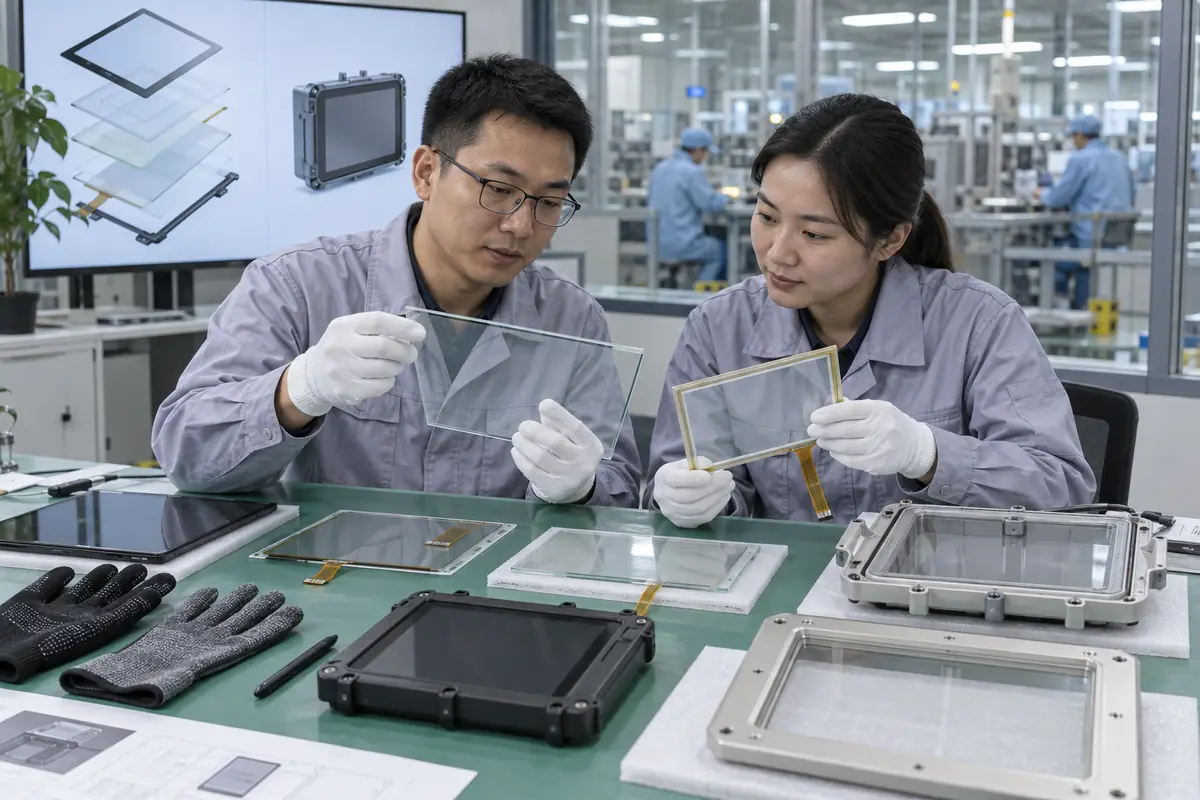
Choose touchscreen technology by matching users, environment, mechanics, optics, electronics, software, lifecycle, and validation needs. A buyer researching "how to choose touchscreen technology" may receive mismatched quotations because suppliers use familiar terms for different delivery scopes. This guide applies "how to choose touchscreen technology" across ten practical checks for engineering, purchasing, and quality teams. For "how to choose touchscreen technology," Yinghong works from drawings, application conditions, and interface requirements. Use this "how to choose touchscreen technology" review during RFQ checks, sample approval, integration testing, and production release. That sequence helps your team compare factories on one basis for "how to choose touchscreen technology" without broad marketing claims. It keeps "how to choose touchscreen technology" scope connected with evidence that engineers and inspectors can verify.
1. Who Will Operate the Touchscreen?
Touchscreen selection starts with users because finger size, gloves, dexterity, training, accessibility, and urgency shape interaction. Teams researching "how to choose touchscreen technology" also need a clear decision on user profile. A consumer-style gesture interface may not suit rushed or gloved work. Operators in factories, clinics, vehicles, and public kiosks bring different habits and constraints.
Start with user profile. A practical decision on user profile needs application data, product drawings, and relevant evidence. No sales phrase can prove user profile for "how to choose touchscreen technology." Keep measurable user profile acceptance points and approved references available for supplier and buyer.
How should buyers score user profile?
- Identify user groups
- Record glove types
- Review accessibility
- Map urgent actions
| Buyer check | Evidence | Release rule |
|---|---|---|
| Identify user groups | Controlled drawing | Scope and revision match |
| Record glove types | Approved sample | Construction matches approval |
| Review accessibility | Relevant test record | Method fits stated use |
| Map urgent actions | Batch inspection record | Result meets agreed limit |
Use the capacitive touchscreen options as related context for "how to choose touchscreen technology." Buyer action: observe representative users and write measurable input requirements.
2. Which Input Objects Must Work?
Touchscreen selection depends on whether users need bare fingers, work gloves, medical gloves, passive styli, active pens, or other objects. In an RFQ, the phrase "how to choose touchscreen technology" must cover input objects without ambiguity. Capacitive and resistive technologies respond through different physical mechanisms. A vague claim such as stylus support can hide material or tip-size limits.
A drawing for input objects settles this quickly. Review input objects with teams that own mechanics, electronics, firmware, purchasing, and quality. Each function sees a different input objects failure path. A short cross-functional review prevents expensive assumptions around "how to choose touchscreen technology" and records ownership.
How should buyers score input objects?
- List finger use
- Name glove material
- Define stylus
- Set minimum target
| Buyer check | Evidence | Release rule |
|---|---|---|
| List finger use | Controlled drawing | Scope and revision match |
| Name glove material | Approved sample | Construction matches approval |
| Define stylus | Relevant test record | Method fits stated use |
| Set minimum target | Batch inspection record | Result meets agreed limit |
Use the resistive touchscreen options as related context for "how to choose touchscreen technology." Buyer action: send actual input objects with sample test instructions.
3. What Environment Will the Product Face?
Touchscreen selection must account for water, dust, chemicals, temperature, condensation, sunlight, vibration, shock, and electrical noise. The question "how to choose touchscreen technology" also raises a practical issue around environment. Passing touch tests at room conditions does not prove field stability. Environment affects sensor choice, cover design, sealing, bonding, firmware, connector, and enclosure.
Factory evidence for environment beats a sales label. A useful review connects environment with one drawing, one sample revision, and one test plan. Buyers should compare matching scope for environment before price. A supplier should record every accepted deviation involving environment for production and receiving inspection.
How should buyers score environment?
- Set temperature
- Describe liquids
- List chemicals
- Define vibration
| Buyer check | Evidence | Release rule |
|---|---|---|
| Set temperature | Controlled drawing | Scope and revision match |
| Describe liquids | Approved sample | Construction matches approval |
| List chemicals | Relevant test record | Method fits stated use |
| Define vibration | Batch inspection record | Result meets agreed limit |
Use the touch display module integration as related context for "how to choose touchscreen technology." Buyer action: turn each exposure into a defined test on final hardware.
4. What Optical Performance Is Needed?
Touchscreen selection should consider brightness, reflection, haze, viewing angle, color, air gaps, bonding, coatings, and cover printing. For a buyer asking "how to choose touchscreen technology," sourcing decisions depend on optical needs. A transparent sensor still adds interfaces that can change light transmission and reflection. Selecting only by touch response may produce a hard-to-read outdoor or clinical display.
Check optical needs before sampling. Treat optical needs as a project condition rather than catalog copy. Engineering can define a pass rule for optical needs before samples arrive. Purchasing and quality teams can then apply that rule without hidden changes in "how to choose touchscreen technology."
How should buyers score optical needs?
- Set brightness target
- Check reflection
- Review haze
- Test viewing angle
| Buyer check | Evidence | Release rule |
|---|---|---|
| Set brightness target | Controlled drawing | Scope and revision match |
| Check reflection | Approved sample | Construction matches approval |
| Review haze | Relevant test record | Method fits stated use |
| Test viewing angle | Batch inspection record | Result meets agreed limit |
Use the fully laminated touchscreen construction as related context for "how to choose touchscreen technology." Buyer action: review optical stack under real lighting before tooling release.
5. Which Mechanical Constraints Apply?
Touchscreen selection must fit cover outline, active area, thickness, tail route, connector, bezel, gasket, mounting, and service access. Teams researching "how to choose touchscreen technology" also need a clear decision on mechanical fit. A sensor that works electrically may remain impossible to assemble reliably. Panel stiffness and mounting load can also influence bonding stress or touch behavior.
One missing mechanical fit detail can shift ownership. Buyers should ask how factory controls carry mechanical fit from design review into production. One sample for mechanical fit shows a single build at one moment. Batch records for "how to choose touchscreen technology" reveal whether materials, firmware, tooling, and inspection stayed aligned.
How should buyers score mechanical fit?
- Confirm outline
- Route FPC
- Set gasket load
- Check service access
| Buyer check | Evidence | Release rule |
|---|---|---|
| Confirm outline | Controlled drawing | Scope and revision match |
| Route FPC | Approved sample | Construction matches approval |
| Set gasket load | Relevant test record | Method fits stated use |
| Check service access | Batch inspection record | Result meets agreed limit |
Use the industrial control touchscreen solutions as related context for "how to choose touchscreen technology." Buyer action: use a tolerance stack and enclosure prototype during selection.
6. Which Electronics and Software Are Available?
Touchscreen selection should match host ports, voltage, drivers, operating system, processor resources, EMC design, and update capability. In an RFQ, the phrase "how to choose touchscreen technology" must cover electronics and software without ambiguity. Controller tools and supplier support can shorten tuning work on custom stacks. A low-cost panel may create larger firmware or board expenses.
Keep teams aligned on electronics and software. A practical decision on electronics and software needs application data, product drawings, and relevant evidence. No sales phrase can prove electronics and software for "how to choose touchscreen technology." Keep measurable electronics and software acceptance points and approved references available for supplier and buyer.
How should buyers score electronics and software?
- Check host ports
- Review driver support
- Budget tuning
- Plan updates
| Buyer check | Evidence | Release rule |
|---|---|---|
| Check host ports | Controlled drawing | Scope and revision match |
| Review driver support | Approved sample | Construction matches approval |
| Budget tuning | Relevant test record | Method fits stated use |
| Plan updates | Batch inspection record | Result meets agreed limit |
Use the outdoor laminated touchscreen design as related context for "how to choose touchscreen technology." Buyer action: compare full integration effort and long-term software ownership.
7. How Much Customization Is Required?
Touchscreen selection changes when projects need special size, cover printing, holes, coatings, thick glass, custom tail, controller, or bonding. The question "how to choose touchscreen technology" also raises a practical issue around customization. Teams can over-customize before confirming which features create real value. Customization can improve fit but adds tooling, samples, validation, documentation, and change-control needs.
Test the complete case for customization. Review customization with teams that own mechanics, electronics, firmware, purchasing, and quality. Each function sees a different customization failure path. A short cross-functional review prevents expensive assumptions around "how to choose touchscreen technology" and records ownership.
How should buyers score customization?
- Mark mandatory items
- Mark preferences
- Estimate tooling
- Plan sample rounds
| Buyer check | Evidence | Release rule |
|---|---|---|
| Mark mandatory items | Controlled drawing | Scope and revision match |
| Mark preferences | Approved sample | Construction matches approval |
| Estimate tooling | Relevant test record | Method fits stated use |
| Plan sample rounds | Batch inspection record | Result meets agreed limit |
Use the medical touchscreen applications as related context for "how to choose touchscreen technology." Buyer action: separate mandatory requirements from preferences before requesting drawings.
8. What Reliability Evidence Should Buyers Request?
Touchscreen selection needs evidence matched with final construction and expected use rather than a generic family report. For a buyer asking "how to choose touchscreen technology," sourcing decisions depend on reliability evidence. Temperature, humidity, thermal shock, vibration, impact, chemical, touch life, and EMC may apply differently by product. A report for another size, controller, or stack can give false confidence.
Make reliability evidence traceable. A useful review connects reliability evidence with one drawing, one sample revision, and one test plan. Buyers should compare matching scope for reliability evidence before price. A supplier should record every accepted deviation involving reliability evidence for production and receiving inspection.
How should buyers score reliability evidence?
- Match product ID
- Match test method
- Check sample size
- Review results
| Buyer check | Evidence | Release rule |
|---|---|---|
| Match product ID | Controlled drawing | Scope and revision match |
| Match test method | Approved sample | Construction matches approval |
| Check sample size | Relevant test record | Method fits stated use |
| Review results | Batch inspection record | Result meets agreed limit |
Use the vehicle navigation touchscreens as related context for "how to choose touchscreen technology." Buyer action: build a requirement-to-evidence matrix with product identity and limits.
9. How Should Samples Be Compared?
Touchscreen selection should use identical test fixtures, host hardware, software, cover stack, environment, and scoring rules across candidates. Teams researching "how to choose touchscreen technology" also need a clear decision on sample comparison. Changing several variables at once prevents a clean decision. Side-by-side testing reveals differences hidden by separate supplier demonstrations.
Production control for sample comparison closes the loop. Treat sample comparison as a project condition rather than catalog copy. Engineering can define a pass rule for sample comparison before samples arrive. Purchasing and quality teams can then apply that rule without hidden changes in "how to choose touchscreen technology."
How should buyers score sample comparison?
- Use same host
- Use same overlay
- Use same test
- Record deviations
| Buyer check | Evidence | Release rule |
|---|---|---|
| Use same host | Controlled drawing | Scope and revision match |
| Use same overlay | Approved sample | Construction matches approval |
| Use same test | Relevant test record | Method fits stated use |
| Record deviations | Batch inspection record | Result meets agreed limit |
Use the factory background as related context for "how to choose touchscreen technology." Buyer action: use one controlled matrix and document every deviation.
10. How Should a Final Choice Be Released?
Touchscreen selection ends with a signed decision covering technology, supplier, stack, controller, firmware, drawings, tests, cost, schedule, and lifecycle. In an RFQ, the phrase "how to choose touchscreen technology" must cover selection release without ambiguity. Release records preserve reasoning when team members or supply conditions change. A decision without revision control can unravel during mass production.
Put selection release into writing. Buyers should ask how factory controls carry selection release from design review into production. One sample for selection release shows a single build at one moment. Batch records for "how to choose touchscreen technology" reveal whether materials, firmware, tooling, and inspection stayed aligned.
How should buyers score selection release?
- Sign decision matrix
- Lock revisions
- Store samples
- Define revalidation
Use the engineering contact as related context for "how to choose touchscreen technology." Buyer action: freeze approved references and define conditions that require revalidation.
Frequently Asked Questions About how to choose touchscreen technology
Q1: What does how to choose touchscreen technology mean for a buyer? It defines selection criteria, tradeoffs, sample tests, and supplier evidence. Purchasing, engineering, and quality teams can then compare suppliers on one basis for "how to choose touchscreen technology."
Q2: Which information should I send with an RFQ about how to choose touchscreen technology? Send application conditions, target dimensions, interface needs, environmental limits, annual volume, and requirements connected with input objects.
Q3: Can I approve how to choose touchscreen technology from a visual sample alone? No. A visual sample cannot prove electronics and software, controller behavior, dimensional consistency, or batch control. Pair "how to choose touchscreen technology" samples with drawings and test records.
Q4: How do I know whether two how to choose touchscreen technology quotations match? Build a how to choose touchscreen technology comparison sheet for delivery scope, materials, controller, firmware, interfaces, dimensions, tolerances, and tests. Add documentation, packing, and change-control fields for "how to choose touchscreen technology."
Q5: What should I verify before how to choose touchscreen technology mass production? Verify signed drawings, approved samples, integration results, golden firmware, inspection rules, packaging, and factory controls for sample comparison.