
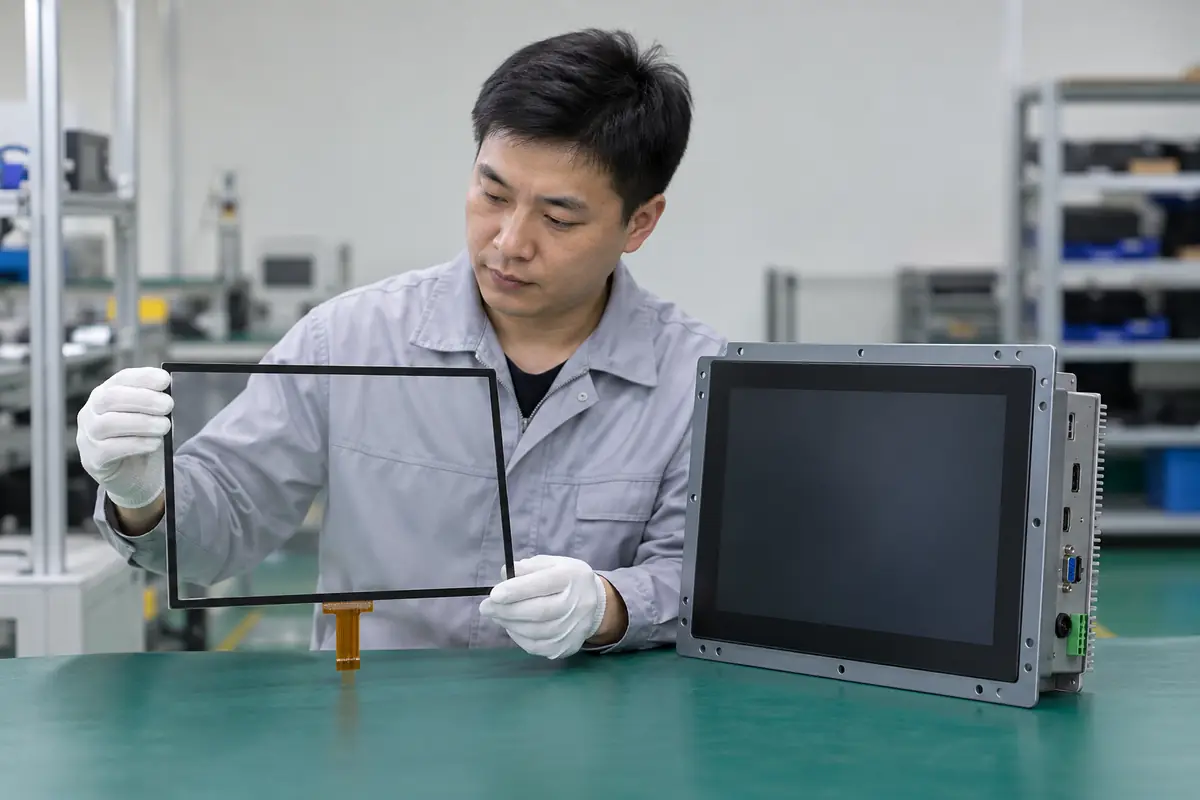
A touchscreen component integrates into another device, while a touch monitor arrives as a housed display with touch input and external system interfaces. A buyer researching "touchscreen component vs touch monitor" may receive mismatched quotations because suppliers use familiar terms for different delivery scopes. This guide applies "touchscreen component vs touch monitor" across ten practical checks for engineering, purchasing, and quality teams. For "touchscreen component vs touch monitor," Yinghong works from drawings, application conditions, and interface requirements. Use this "touchscreen component vs touch monitor" review during RFQ checks, sample approval, integration testing, and production release. That sequence helps your team compare factories on one basis for "touchscreen component vs touch monitor" without broad marketing claims. It keeps "touchscreen component vs touch monitor" scope connected with evidence that engineers and inspectors can verify.
1. What Is the Integration-Level Difference?
Product-level scope separates a component-level assembly from a finished peripheral intended for direct mounting or desktop use. Teams researching "touchscreen component vs touch monitor" also need a clear decision on integration level. A monitor bundles more functions but may limit custom geometry. A component may need host electronics, enclosure, power, cables, thermal design, and validation.
Start with integration level. Treat integration level as a project condition rather than catalog copy. Engineering can define a pass rule for integration level before samples arrive. Purchasing and quality teams can then apply that rule without hidden changes in "touchscreen component vs touch monitor."
How does integration level change the purchase?
- List missing functions
- List monitor functions
- Mark buyer work
- Mark supplier work
| Buyer check | Evidence | Release rule |
|---|---|---|
| List missing functions | Controlled drawing | Scope and revision match |
| List monitor functions | Approved sample | Construction matches approval |
| Mark buyer work | Relevant test record | Method fits stated use |
| Mark supplier work | Batch inspection record | Result meets agreed limit |
Use the capacitive touchscreen options as related context for "touchscreen component vs touch monitor." Buyer action: define desired system boundary before collecting quotations.
2. Which Enclosure Parts Are Included?
Product-level scope changes whether buyer receives bare glass and module parts or a sealed metal or plastic housing. In an RFQ, the phrase "touchscreen component vs touch monitor" must cover enclosure scope without ambiguity. Monitors can include bezel, rear cover, stand, VESA mount, panel mount, gasket, controls, and cable restraint. Mechanical drawings may omit installed clearances or connector access.
A drawing for enclosure scope settles this quickly. Buyers should ask how factory controls carry enclosure scope from design review into production. One sample for enclosure scope shows a single build at one moment. Batch records for "touchscreen component vs touch monitor" reveal whether materials, firmware, tooling, and inspection stayed aligned.
How does enclosure scope change the purchase?
- Check bezel
- Check rear depth
- Check mounting
- Check cable clearance
| Buyer check | Evidence | Release rule |
|---|---|---|
| Check bezel | Controlled drawing | Scope and revision match |
| Check rear depth | Approved sample | Construction matches approval |
| Check mounting | Relevant test record | Method fits stated use |
| Check cable clearance | Batch inspection record | Result meets agreed limit |
Use the resistive touchscreen options as related context for "touchscreen component vs touch monitor." Buyer action: review complete 3D envelope and mounting details.
3. Which Video and Touch Interfaces Are Used?
Product-level scope gives monitors external ports while components often expose board-level FPCs or headers. The question "touchscreen component vs touch monitor" also raises a practical issue around external interfaces. Interface adapters can add latency, space, power, or lifecycle risk. A monitor may use HDMI, DisplayPort, VGA, USB, serial, or industrial connectors depending on design.
Factory evidence for external interfaces beats a sales label. A practical decision on external interfaces needs application data, product drawings, and relevant evidence. No sales phrase can prove external interfaces for "touchscreen component vs touch monitor." Keep measurable external interfaces acceptance points and approved references available for supplier and buyer.
How does external interfaces change the purchase?
- List video ports
- List touch ports
- Check cable length
- Check locking
| Buyer check | Evidence | Release rule |
|---|---|---|
| List video ports | Controlled drawing | Scope and revision match |
| List touch ports | Approved sample | Construction matches approval |
| Check cable length | Relevant test record | Method fits stated use |
| Check locking | Batch inspection record | Result meets agreed limit |
Use the touch display module integration as related context for "touchscreen component vs touch monitor." Buyer action: match host outputs with native monitor ports and cable requirements.
4. Who Supplies Power Conversion?
Product-level scope shifts power conversion from buyer electronics toward an internal monitor supply or external adapter. For a buyer asking "touchscreen component vs touch monitor," sourcing decisions depend on power architecture. Input voltage range, connector, grounding, surge, thermal load, and standby behavior matter for system fit. A nominal voltage match can hide inrush or grounding problems.
Check power architecture before sampling. Review power architecture with teams that own mechanics, electronics, firmware, purchasing, and quality. Each function sees a different power architecture failure path. A short cross-functional review prevents expensive assumptions around "touchscreen component vs touch monitor" and records ownership.
How does power architecture change the purchase?
- Check voltage range
- Measure inrush
- Review grounding
- Test standby
| Buyer check | Evidence | Release rule |
|---|---|---|
| Check voltage range | Controlled drawing | Scope and revision match |
| Measure inrush | Approved sample | Construction matches approval |
| Review grounding | Relevant test record | Method fits stated use |
| Test standby | Batch inspection record | Result meets agreed limit |
Use the fully laminated touchscreen construction as related context for "touchscreen component vs touch monitor." Buyer action: verify power profile under startup, full brightness, sleep, and fault conditions.
5. How Does Environmental Protection Differ?
Product-level scope changes how sealing, cooling, corrosion, dust, liquid, and impact protection are assigned. Teams researching "touchscreen component vs touch monitor" also need a clear decision on environmental protection. An IP claim may apply only to front face under a specific mounting method. A component depends on host enclosure while a monitor can provide its own front or full housing protection.
One missing environmental protection detail can shift ownership. A useful review connects environmental protection with one drawing, one sample revision, and one test plan. Buyers should compare matching scope for environmental protection before price. A supplier should record every accepted deviation involving environmental protection for production and receiving inspection.
How does environmental protection change the purchase?
- Check rating scope
- Check gasket
- Check rear protection
- Review cooling
| Buyer check | Evidence | Release rule |
|---|---|---|
| Check rating scope | Controlled drawing | Scope and revision match |
| Check gasket | Approved sample | Construction matches approval |
| Check rear protection | Relevant test record | Method fits stated use |
| Review cooling | Batch inspection record | Result meets agreed limit |
Use the industrial control touchscreen solutions as related context for "touchscreen component vs touch monitor." Buyer action: read rating scope and reproduce required installation conditions.
6. Which Compliance Work Remains?
Product-level scope shifts compliance evidence because a finished monitor contains more powered electronics and enclosure materials. In an RFQ, the phrase "touchscreen component vs touch monitor" must cover compliance responsibility without ambiguity. Market, use, power supply, radio features, safety class, and final system can change required assessments. Component reports do not automatically cover a complete machine.
Keep teams aligned on compliance responsibility. Treat compliance responsibility as a project condition rather than catalog copy. Engineering can define a pass rule for compliance responsibility before samples arrive. Purchasing and quality teams can then apply that rule without hidden changes in "touchscreen component vs touch monitor."
How does compliance responsibility change the purchase?
- Name destination
- Define product class
- Collect reports
- Plan system tests
| Buyer check | Evidence | Release rule |
|---|---|---|
| Name destination | Controlled drawing | Scope and revision match |
| Define product class | Approved sample | Construction matches approval |
| Collect reports | Relevant test record | Method fits stated use |
| Plan system tests | Batch inspection record | Result meets agreed limit |
Use the outdoor laminated touchscreen design as related context for "touchscreen component vs touch monitor." Buyer action: coordinate product-level requirements with qualified compliance staff early.
7. How Does Customization Change?
Product-level scope gives components more freedom for cover shape, active area, frame, cable, bonding, and host design. The question "touchscreen component vs touch monitor" also raises a practical issue around customization options. Deep monitor customization can approach cost and schedule of a new product. Monitors usually offer narrower custom choices around housing, ports, branding, firmware, or mounting.
Test the complete case for customization options. Buyers should ask how factory controls carry customization options from design review into production. One sample for customization options shows a single build at one moment. Batch records for "touchscreen component vs touch monitor" reveal whether materials, firmware, tooling, and inspection stayed aligned.
How does customization options change the purchase?
- List geometry needs
- List port needs
- List branding
- Estimate tooling
| Buyer check | Evidence | Release rule |
|---|---|---|
| List geometry needs | Controlled drawing | Scope and revision match |
| List port needs | Approved sample | Construction matches approval |
| List branding | Relevant test record | Method fits stated use |
| Estimate tooling | Batch inspection record | Result meets agreed limit |
Use the medical touchscreen applications as related context for "touchscreen component vs touch monitor." Buyer action: rank custom needs before selecting product level.
8. How Do Service and Replacement Differ?
Product-level scope affects whether field staff replace one monitor or open equipment and handle fragile components. For a buyer asking "touchscreen component vs touch monitor," sourcing decisions depend on service strategy. Monitor swaps can reduce repair skill while component replacement can lower part cost and preserve enclosure. Bonded or sealed designs may change repair economics.
Make service strategy traceable. A practical decision on service strategy needs application data, product drawings, and relevant evidence. No sales phrase can prove service strategy for "touchscreen component vs touch monitor." Keep measurable service strategy acceptance points and approved references available for supplier and buyer.
How does service strategy change the purchase?
- Choose replaceable unit
- Plan spares
- Estimate labor
- Define calibration
| Buyer check | Evidence | Release rule |
|---|---|---|
| Choose replaceable unit | Controlled drawing | Scope and revision match |
| Plan spares | Approved sample | Construction matches approval |
| Estimate labor | Relevant test record | Method fits stated use |
| Define calibration | Batch inspection record | Result meets agreed limit |
Use the vehicle navigation touchscreens as related context for "touchscreen component vs touch monitor." Buyer action: model failure isolation, spare stock, labor, calibration, and downtime.
9. Which Tests Belong at Receiving?
Product-level scope needs component checks for fragile parts and monitor checks for full video, touch, ports, power, housing, and accessories. Teams researching "touchscreen component vs touch monitor" also need a clear decision on receiving inspection. Using one test station for both product levels can miss scope-specific faults. Monitor packaging and transport damage also deserve inspection.
Production control for receiving inspection closes the loop. Review receiving inspection with teams that own mechanics, electronics, firmware, purchasing, and quality. Each function sees a different receiving inspection failure path. A short cross-functional review prevents expensive assumptions around "touchscreen component vs touch monitor" and records ownership.
How does receiving inspection change the purchase?
- Check cosmetics
- Run touch test
- Run video test
- Verify accessories
| Buyer check | Evidence | Release rule |
|---|---|---|
| Check cosmetics | Controlled drawing | Scope and revision match |
| Run touch test | Approved sample | Construction matches approval |
| Run video test | Relevant test record | Method fits stated use |
| Verify accessories | Batch inspection record | Result meets agreed limit |
Use the factory background as related context for "touchscreen component vs touch monitor." Buyer action: create dedicated fixtures and checklists for each purchased form.
10. Which Product Level Fits Your Project?
Product-level scope depends on design freedom, engineering resources, enclosure plan, certifications, service model, volume, and schedule. In an RFQ, the phrase "touchscreen component vs touch monitor" must cover product-level decision without ambiguity. Components suit OEM integration while monitors suit faster deployment or standardized mounting. Total cost should include all work between delivery and field operation.
Put product-level decision into writing. A useful review connects product-level decision with one drawing, one sample revision, and one test plan. Buyers should compare matching scope for product-level decision before price. A supplier should record every accepted deviation involving product-level decision for production and receiving inspection.
How does product-level decision change the purchase?
- Compare system BOM
- Compare engineering
- Compare compliance
- Compare service
Use the engineering contact as related context for "touchscreen component vs touch monitor." Buyer action: choose after comparing one complete system bill and responsibility map.
Frequently Asked Questions About touchscreen component vs touch monitor
Q1: What does touchscreen component vs touch monitor mean for a buyer? It defines integration level, enclosure, interfaces, compliance, service, and total cost. Purchasing, engineering, and quality teams can then compare suppliers on one basis for "touchscreen component vs touch monitor."
Q2: Which information should I send with an RFQ about touchscreen component vs touch monitor? Send application conditions, target dimensions, interface needs, environmental limits, annual volume, and requirements connected with enclosure scope.
Q3: Can I approve touchscreen component vs touch monitor from a visual sample alone? No. A visual sample cannot prove compliance responsibility, controller behavior, dimensional consistency, or batch control. Pair "touchscreen component vs touch monitor" samples with drawings and test records.
Q4: How do I know whether two touchscreen component vs touch monitor quotations match? Build a touchscreen component vs touch monitor comparison sheet for delivery scope, materials, controller, firmware, interfaces, dimensions, tolerances, and tests. Add documentation, packing, and change-control fields for "touchscreen component vs touch monitor."
Q5: What should I verify before touchscreen component vs touch monitor mass production? Verify signed drawings, approved samples, integration results, golden firmware, inspection rules, packaging, and factory controls for receiving inspection.