Selecting an ARM architecture for your equipment provides a superior balance of low power consumption, reduced heat generation, and cost-effective scaling compared to traditional x86 systems.
You face a constant struggle: integrating advanced user interfaces into your machinery without introducing heat-related failures or ballooning costs. Using high-powered PC architectures often leads to bulky enclosures and frequent maintenance due to cooling fan failures. This instability agitates your production schedule, creates unnecessary downtime for your end-users, and risks your hard-earned reputation for building reliable equipment. The solution is moving to an ARM-based Industrial Touchscreen , which offers the “cool-running” reliability and lean performance required for 24/7 factory floor operation.
Why choose ARM for an industrial touchscreen?
Selecting ARM architecture ensures your system remains energy-efficient and highly reliable even under heavy continuous loads. Integrating an Industrial Touchscreen powered by ARM allows you to build slimmer, more modern equipment that doesn’t require aggressive cooling.
Power efficiency and thermal management
ARM processors are designed to execute instructions with minimal energy draw, which translates directly to lower heat output. This allows your machines to operate in enclosed, non-ventilated spaces without the risk of thermal throttling.
The best part?
- Reduced energy costs for the end-user.
- Elimination of cooling fans and filters.
- Slimmer profile for easier machine mounting.
- Extended lifespan of internal components.
You can finally stop worrying about fan failure leading to a total system meltdown on the factory floor.
Cost-effective scalability for production
Because ARM chips are often integrated as Systems on a Chip (SoC), they reduce the overall part count on the internal PCB. This streamlined design makes it much easier to scale your production while keeping the per-unit cost of your interface manageable.
Think about it.
- Lower initial hardware acquisition costs.
- Reduced shipping weight due to lighter components.
- Longer product availability cycles.
- Simplified replacement and maintenance protocols.
Key Takeaway: Efficiency Meets Value
| Feature | ARM Architecture | Traditional x86 |
|---|---|---|
| Power Draw | 3W – 15W | 15W – 65W+ |
| Cooling | Passive (Fanless) | Active (Fanned) |
| Heat Output | Low | High |
This comparison highlights how ARM architecture significantly lowers operational risks by removing the most common mechanical failure points.
How does performance impact ARM HMI applications?
ARM performance has evolved to handle complex data visualization and real-time machine monitoring without the lag associated with older embedded systems. Your Industrial Touchscreen needs to be responsive enough to show critical sensor data the millisecond it changes.
Processing speed for data-heavy tasks
Modern multi-core ARM chips can process thousands of PLC data points while simultaneously running a high-resolution graphical user interface. This ensures that your operators never have to wait for a screen to “catch up” during a critical adjustment.
It gets better.
- Dual and Quad-core options available.
- High-speed DDR4 memory support.
- Instant-on boot times for rapid recovery.
- Seamless multitasking between HMI and logic.
Reliable processing power ensures your machine’s interface feels professional and responsive to the touch.
Graphics and visual clarity
High-definition graphics are no longer a luxury; they are a requirement for modern safety alerts and diagnostic dashboards. ARM’s integrated GPUs handle 3D rendering and high-bitrate video with ease, providing a crisp visual experience for your operators.
Here is the kicker.
- Support for 1080p and 4K resolutions.
- Smooth transitions and animations.
- Dedicated hardware video decoding.
- Optimized drivers for industrial OS.
Key Takeaway: Modern Processing Power
| Spec | Basic ARM Core | High-Performance ARM |
|---|---|---|
| CPU Speed | 1.0 GHz | 2.0 GHz+ |
| Core Count | 2 Cores | 4 – 8 Cores |
| GPU Capability | 2D Graphics | Full 3D Acceleration |
Selecting a higher core count ensures that your interface remains fluid even as you add more complex monitoring features.
What thermal advantages does ARM offer for machines?
ARM’s primary thermal advantage is its ability to operate at peak performance without the need for active cooling fans. For your Industrial Touchscreen, this means the entire unit can be completely sealed against the dust and debris found in your manufacturing facility.
Fanless design for harsh environments
A fanless design removes the primary entry point for contaminants like metallic dust, oil mist, and moisture. By relying on passive heat dissipation through the metal housing, your touchscreen stays clean and operational for years longer than fanned units.
Want to know the best part?
- No moving parts to wear out.
- IP65 sealing is easier to achieve.
- Silent operation in quiet environments.
- Reduced maintenance schedules for filters.
Fanless systems are the gold standard for any manufacturer who values long-term hardware stability.
Reliability in high-temperature zones
ARM architecture is inherently more resilient to ambient temperature fluctuations because it doesn’t rely on outside air for cooling. Whether your machine is in a cold storage facility or near a high-heat forge, the internal components stay within safe margins.
Bottom line?
- Operating range often exceeds 70°C.
- No “dead spots” in airflow.
- Reduced risk of condensation buildup.
- Stable clock speeds in hot weather.
Key Takeaway: Thermal Stability
| Factor | Fanless ARM | Traditional Fanned PC |
|---|---|---|
| Dust Sensitivity | Low (Sealed) | High (Vented) |
| MTBF | High (No Fans) | Moderate (Fan Failure) |
| Noise Level | 0 dB | 35-45 dB |
The move to fanless ARM hardware eliminates the maintenance nightmare of clogged filters and seized fan bearings.
Which OS is best for ARM-based touchscreens?
The choice between Android and Linux depends on whether you prioritize rapid user-interface development or deep system-level control. Your Industrial Touchscreen will perform best when the operating system is optimized specifically for the ARM instruction set.
Android for rapid UI deployment
Android provides a familiar, smartphone-like experience that reduces the learning curve for your machine operators. It offers a massive library of development tools that allow you to create beautiful, touch-centric interfaces in a fraction of the time.
Think about it.
- Intuitive multi-touch gestures.
- Easy integration of web-based apps.
- Built-in support for wireless peripherals.
- Standardized app update protocols.
Android is the ideal choice if you want to deliver a cutting-edge, consumer-grade feel to your industrial equipment.
Linux for mission-critical stability
Linux distributions like Debian or Ubuntu provide the granular control needed for highly secure or complex industrial applications. It allows you to strip away unnecessary background processes, ensuring every bit of ARM power goes toward running your machine.
Here is the deal.
- Long-term support (LTS) versions available.
- Highest level of cybersecurity.
- Native support for industrial protocols.
- Compact OS footprint for speed.
Key Takeaway: Choosing Your Platform
| Criteria | Android OS | Industrial Linux |
|---|---|---|
| Development Speed | Very Fast | Moderate |
| System Control | Limited | High |
| UI Aesthetics | Modern/Polished | Functional/Custom |
Matching your software platform to your internal engineering team’s strengths is the fastest path to a successful product launch.
How do I select the right touch technology for ARM?
You must choose between Projected Capacitive (PCAP) for modern multi-touch or Resistive for environments where operators wear heavy protective gear. The Industrial Touchscreen you select must have a controller that is fully compatible with your chosen ARM processor’s communication ports.
PCAP for modern user experiences
PCAP touchscreens offer the sleek, “edge-to-edge” glass design that modern buyers expect from high-end machinery. They support multi-touch gestures like pinching and zooming, which is essential for navigating complex technical drawings or maps.
The best part?
- Scratch-resistant glass surfaces.
- Superior optical clarity and brightness.
- Support for 10-point multi-touch.
- Easy to clean and disinfect.
PCAP is the superior choice for most medical, laboratory, and high-tech manufacturing environments.
Resistive for heavy industrial use
Resistive technology remains the reliable choice for operators wearing thick leather gloves or working in environments with significant electrical noise. It relies on physical pressure rather than electrical conductivity, making it immune to “ghost touches” caused by water or EMI.
Want to know the best part?
- Works with any stylus or glove.
- Highly resistant to electrical interference.
- Lower cost for basic HMI tasks.
- Reliable in wet or dusty conditions.
Key Takeaway: Touch Environment Match
| Tech Type | Operator Requirement | Ideal Environment |
|---|---|---|
| PCAP | Bare Hands / Thin Gloves | Clean Room / Labs |
| Resistive | Heavy Work Gloves | Dirty/Heavy Industry |
| Tuned PCAP | Stylus / Water Rejection | Wet Environments |
Choosing the wrong touch technology can lead to operator frustration and decreased safety on the factory floor.
What display specs are critical for ARM architectures?
Brightness and bonding are the two most important factors for ensuring your display remains readable under harsh factory lighting. An Industrial Touchscreen must be specified with enough nits to overcome overhead glare while maintaining the energy efficiency of the ARM board.
Sunlight readability and brightness
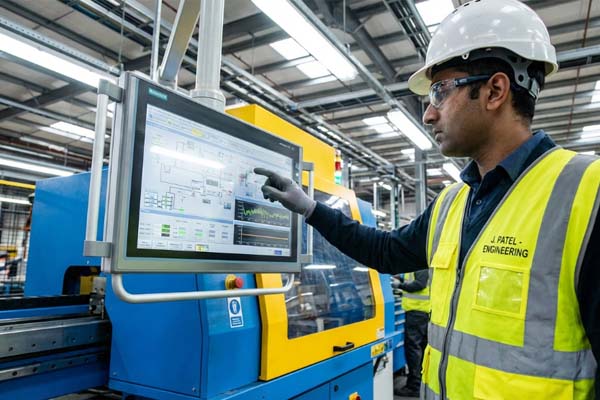
In many factories, high-intensity LED lighting or nearby windows can wash out a standard display. You need at least 500 to 1000 nits of brightness to ensure your safety warnings and data charts remain visible at all times.
It gets better.
- High-contrast ratios for text clarity.
- Wide viewing angles for operators.
- Adjustable backlighting for night shifts.
- Low-power LED backlight technology.
Readability is a safety feature that prevents operators from misinterpreting critical machine status data.
Optical bonding for durability
Optical bonding fills the air gap between the touch panel and the LCD with a specialized resin. This process significantly reduces internal reflections and prevents condensation from forming inside the screen in humid environments.
Bottom line?
- Eliminates internal dust and moisture.
- Improves impact resistance of the glass.
- Enhances color vibrance and contrast.
- Reduces the “parallax” touch error.
Key Takeaway: Visibility and Ruggedness
| Spec | Standard Display | Industrial Grade |
|---|---|---|
| Brightness | 250 nits | 500 – 1000+ nits |
| Lamination | Air Gap | Optical Bonding |
| Viewing Angle | Narrow | Wide (85/85/85/85) |
Optical bonding and high brightness turn a standard screen into a professional-grade industrial interface.
How important is connectivity in industrial ARM panels?
Connectivity allows your touchscreen to act as a central hub, communicating with both legacy machinery and modern cloud-based monitoring systems. Your ARM-based Industrial Touchscreen should include built-in support for the standard protocols used in your specific industry.
Industrial serial and fieldbus support
Most ARM boards for industrial use come equipped with RS232, RS485, and CAN bus interfaces. These allow your panel to talk directly to PLCs and motor controllers without the need for expensive external adapters.
Think about it.
- Direct connection to legacy hardware.
- Reduced cabling and point-of-failure.
- Real-time serial data monitoring.
- Reliable wired communication.
Having the right ports built-in saves you hours of integration headaches during the machine design phase.
Modern IoT and wireless options
For factories moving toward Industry 4.0, integrated Wi-Fi, Bluetooth, and Power over Ethernet (PoE) are essential. These features allow for remote diagnostics and simplified installation where running power cables is difficult.
Here is the kicker.
- PoE reduces installation costs by 50%.
- Wireless monitoring for mobile tablets.
- OTA (Over-the-Air) software updates.
- Bluetooth for wireless sensor pairing.
Key Takeaway: Integration Capacity
| Port Type | Usage | Benefit |
|---|---|---|
| RS232/485 | PLC / Motor Control | Legacy Compatibility |
| PoE LAN | Data + Power over 1 Cable | Cheap Installation |
| CAN Bus | Vehicle / Motion Control | Real-time Precision |
Built-in connectivity ensures your ARM panel remains the “brain” of your equipment for its entire lifecycle.
What are the key durability ratings to look for?
Durability ratings like IP65 and IK08 guarantee that your hardware can survive the physical rigors of a working factory. An Industrial Touchscreen with the right certifications protects your investment from accidental impacts and high-pressure washdowns.
Ingress protection and chemical resistance
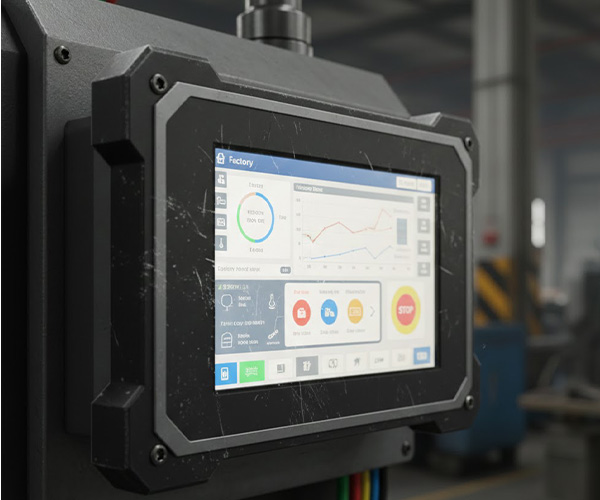
A front-panel IP65 rating means your screen is completely protected against dust and low-pressure water jets. Furthermore, selecting chemically strengthened glass ensures that frequent cleaning with alcohol or bleach won’t degrade the touch surface.
Want to know the best part?
- Withstands daily chemical washdowns.
- Protects internal electronics from oil.
- Prevents dust buildup inside ports.
- Maintains clarity after years of cleaning.
Chemical resistance is critical for food processing and medical applications where hygiene is the top priority.
Impact resistance and vibration damping
In heavy industrial settings, tools are dropped and machines vibrate constantly. Look for IK-rated glass (impact resistance) and internal mounting systems designed to dampen the vibrations caused by large motors or presses.
Bottom line?
- Prevents screen cracking from impacts.
- Protects internal connectors from loosening.
- Extended life in high-vibration zones.
- Reduced liability from shattered glass.
Key Takeaway: Protecting the Investment
| Rating | Meaning | Benefit |
|---|---|---|
| IP65 | Dust-tight / Water-resistant | Safe for Washdowns |
| IK08 | High Impact Resistance | Vandal / Accident Proof |
| -20 to 70°C | Wide Temp Operation | Reliable in Extremes |
Certifications are your insurance policy against the unpredictable nature of the factory floor.
How does customization affect the selection process?
Customization allows you to tailor the hardware to fit your existing machine cutouts and branding requirements perfectly. A specialized ARM Industrial Touchscreen can be modified at the factory level to include your logo, specific glass thicknesses, or custom cable lengths.
Physical and aesthetic modifications
You shouldn’t have to redesign your machine to fit a standard screen. Custom bezel colors, silk-printed logos, and specialized mounting brackets allow the touchscreen to look like an integrated part of your machine rather than an afterthought.
The best part?
- Reinforces your brand identity.
- Fits existing mechanical drawings.
- Customized glass for extra safety.
- Specialized connectors for your wiring.
Branded hardware shows your customers that you have invested in a high-quality, custom-engineered solution.
Firmware and driver optimization
ARM systems often require specialized driver tuning for unique peripherals or custom touch sensitivity levels. Working with a manufacturer that provides direct engineering support ensures your hardware and software are perfectly synchronized.
Think about it.
- Custom boot logos for your brand.
- Pre-configured OS environments.
- Tuned touch drivers for gloves.
- Locked-down BIOS for security.
Key Takeaway: Tailored Engineering
| Feature | Off-the-Shelf | Custom Engineered |
|---|---|---|
| Branding | Generic | Your Logo/Colors |
| Fitment | Standard VESA | Custom Mounting |
| Software | Generic Drivers | Optimized Firmware |
Customization eliminates the compromises often found when using consumer-grade hardware in industrial settings.
How can you ensure long-term supply chain stability?
Long-term stability is achieved through strict Bill of Materials (BOM) control and choosing industrial-grade processors with guaranteed lifecycles. For your Industrial Touchscreen, you need a partner that guarantees the same components will be available for the next 7 to 10 years.
BOM control and version management
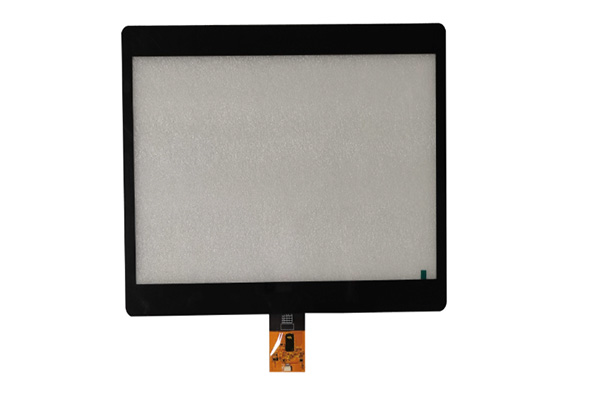
Once you have approved a sample, the manufacturer must “lock” the design. This means they cannot swap out the controller chip or the LCD panel for a different version without your written consent, ensuring 100% consistency across years of production.
Here is the deal.
- No unexpected software crashes.
- Identical performance for every unit.
- Simplified regulatory recertification.
- Predictable maintenance and parts.
Consistency is the foundation of a reliable product line that your customers can trust.
Industrial-grade component sourcing
Unlike consumer tablets that change every 12 months, industrial ARM chips are designed for long-term availability. Choosing these components protects you from “End of Life” (EOL) notices that could force a costly and time-consuming redesign of your machinery.
It gets better.
- 7-10 year component availability.
- Proactive EOL notifications.
- Stable pricing agreements.
- Verified industrial-tier suppliers.
Key Takeaway: Predictable Lifecycles
| Strategy | Benefit | Result |
|---|---|---|
| BOM Lock | No hardware changes | Consistent Quality |
| LTS Support | 7+ year availability | No forced redesigns |
| Direct Factory | No middleman markups | Better Margins |
Securing your supply chain today prevents the expensive fire-drills of tomorrow.
ARM architecture represents the future of industrial human-machine interfaces. By selecting a system that prioritizes thermal efficiency, long-term stability, and deep customization, you solve the chronic problems of downtime, high energy costs, and hardware obsolescence. This strategic choice allows you to focus on what you do best: building world-class machinery.
Ready to revolutionize your machinery interface? contact us today to discuss your project requirements with our engineering team and secure the reliable, custom-built hardware your equipment deserves.
FAQ
Can I get an ARM touchscreen that works with thick welding gloves?Yes, you can choose between a traditional resistive touchscreen or a PCAP screen with a specialized controller tuned for high-sensitivity “glove mode.”
What’s the best way to prevent screen glare in a bright factory?The most effective solution is to specify a high-brightness display (1000 nits) paired with optical bonding and an anti-glare (AG) surface coating.
Can I customize the boot screen with my company logo?Yes, ARM-based systems allow for deep firmware customization, enabling you to display your company branding from the moment the device is powered on.
What is the typical lead time for a custom industrial panel?Standard samples are usually delivered in 2-3 weeks, while fully custom designs requiring new glass tooling typically take 4-6 weeks for the initial prototypes.
Can I use PoE to power a 15-inch industrial screen?Yes, modern ARM architectures are efficient enough to be fully powered and receive data through a single standard PoE+ (802.3at) Ethernet cable.